

 Suyog Kafle
Google Business Profile (formerly Google My Business) is a free tool that puts your tour business in front of travelers on Google Search and Maps. This guide walks through every section of your GBP listing with different strategies for domestic operators serving local travelers and inbound operators targeting foreign tourists. Set it up right and you show up in the local map pack where travelers actually look before booking.
Why Google Business Profile Matters for Tour Operators
46% of all Google searches have local intent. When someone types “walking tours in Edinburgh” or “safari near Nairobi,” Google shows the map pack first. That is three local business listings right at the top, above every organic result on the page.
And here is the thing most tour operators miss. The big online travel agencies like Viator and GetYourGuide cannot compete in the map pack. Why? Because they are not local. You are. Your physical presence in the destination gives you an advantage that no OTA budget can buy.
How Travelers Actually Find Tours on Google
In-destination mobile searches are growing every year. A traveler lands in your city, pulls out their phone, and searches “best tours near me.” Google shows your GBP listing with your photos, reviews, and star rating before they ever see your website.
That GBP listing is often the first impression. Not your homepage. Not your Instagram. Your Google Business Profile. If it is incomplete, outdated, or has bad photos, travelers scroll past you and book with the competitor who took 20 minutes to fill theirs out properly.
Businesses with complete GBP listings are seen as 94% more reputable. And 56% of all actions on GBP listings lead directly to website visits. So this is not just visibility. This is bookings.
Need help setting up and optimizing your Google Business Profile? Nepal SEO Agency handles GBP optimization for tour operators across the world. Talk to our team today.
How to Set Up Your Google Business Profile Step by Step
Check If You Already Have a Listing
Before creating anything, search your business name on Google Maps. Many tour operators already have a listing that Google created automatically from directory data. Past employees or even customers might have created one too.
Search your business name under different variations. If your company was previously called something else, search that too. Duplicate listings hurt your rankings, so find them now and deal with them early.
Claim or Create Your Profile
Go to business.google.com and sign in with a Google account. Use your business email domain if possible. Enter your business name in the search bar. If it already exists, claim it. If not, click “Add your business” and start from scratch.
Google will ask for your business name, category, address, phone number, and website. Fill in everything accurately. Do not rush this step. The information you enter here appears on Google Search and Maps immediately after verification.
Verify Your Business
Google needs to confirm you actually own this business. Verification options include postcard (5 to 14 days), phone call, email, or video walkthrough. The method depends on your business type and location.
Postcard is the most common. Google sends a card to your business address with a code. Enter that code in your GBP dashboard to go live. Do not change your business name or address while waiting for the postcard. That resets the process.
Seasonal operators, you are eligible for a GBP listing as long as you display permanent signage year-round at your location. You do not need to operate 12 months to qualify.
The Address Problem for Tour Operators
This is where most tour operators get confused. And honestly, Google does not make it simple for businesses like yours.
If customers come to your office or shop to start the tour, show your address. That is the standard setup. But if you pick customers up from their hotel or meet them at a specific point, it gets tricky.
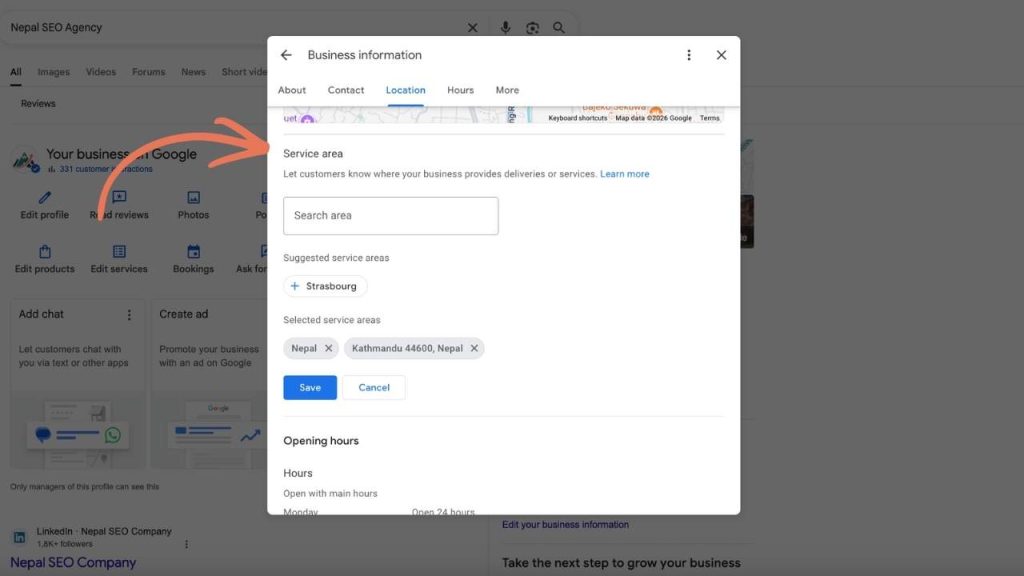
If you go to customers (pickup-based tours), hide your business address and set a service area instead. This way your listing shows up for searches in the area you serve without displaying a physical address that confuses travelers.
If your office is in the city but your tours start at a different location, use your office address. Then add clear directions in your business description explaining where customers should actually go. Do not create multiple listings for the same business. Google will penalize you for it.
Optimizing Every Section of Your Google Business Profile
This is where the real work happens. Each section of your GBP listing serves a purpose. Skip one and you leave bookings on the table. Let us go through them one by one.
Business Name and Tagline Strategy for Travel Local SEO
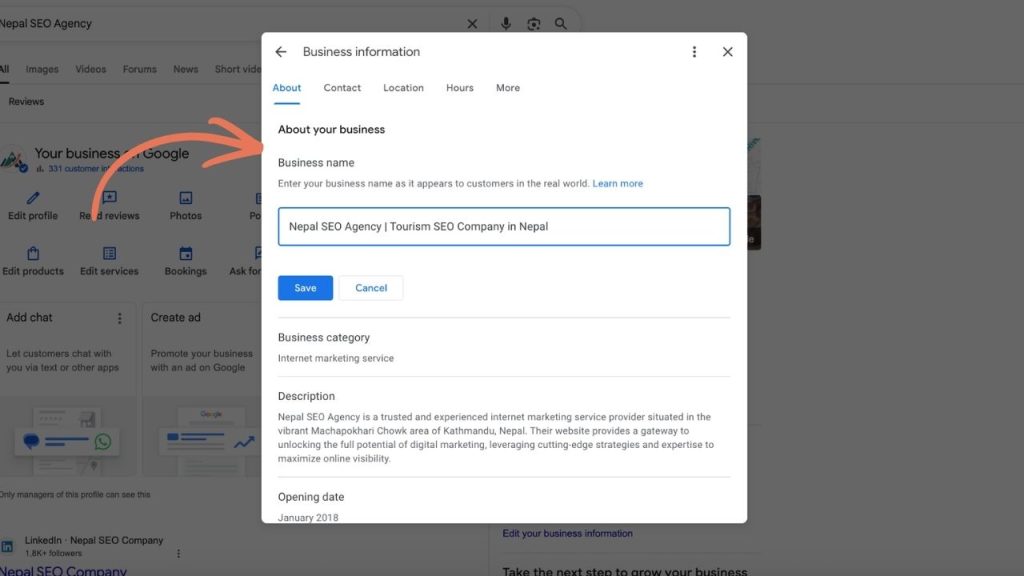
Google’s rule is clear. Use your real registered business name. No keyword stuffing. But there is room to be smart about it.
After your legal business name, you can add a short tagline that represents your company focus. Google sometimes allows this if it is part of your actual brand name or trading name.
For inbound operators serving foreign travelers, your tagline should signal what you do and where you do it. International travelers searching from abroad need to understand your offering instantly. Example: “Highland Explorer | Adventure Tours in Scotland.” Or “Nepal Trails Co | Guided Trekking Adventures in the Himalayas.”
For domestic operators serving local travelers, keep it location-specific and simple. Example: “Cotswolds Day Tours | Walking and Sightseeing from Oxford.” Or “Lake District Adventures | Weekend Hiking Trips.”
What you must never do is stuff keywords like “Best Safari Tours Nairobi Kenya Cheap Safari Booking.” Google will suspend your listing. We have seen it happen to operators who tried this shortcut. It is not worth the risk.
Business Categories: Primary and Secondary
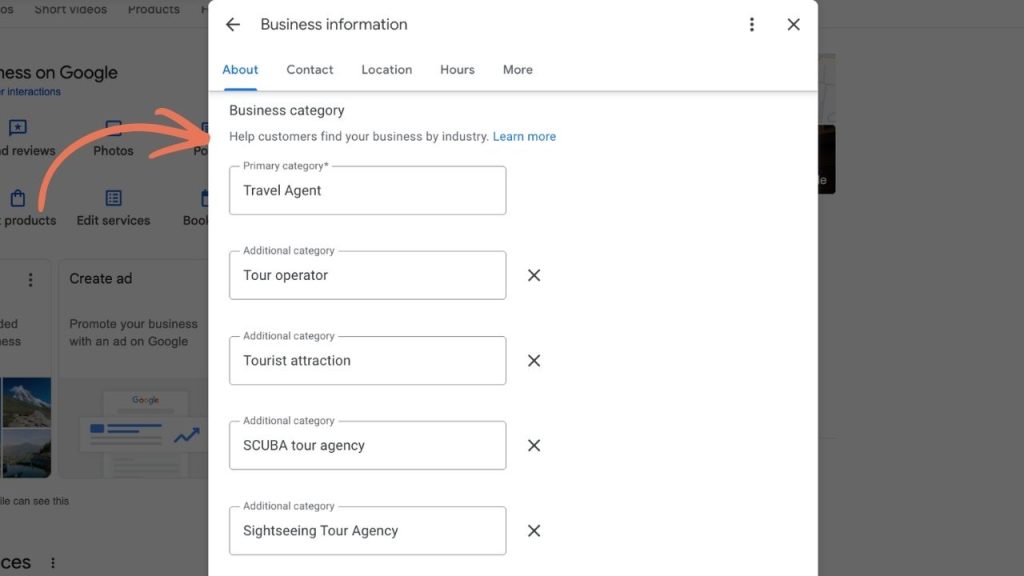
Your primary category is the single most important ranking signal on your entire GBP listing. Choose the one that most accurately describes your core service.
Google offers specific categories for tour businesses. The most common ones for tour operators are:
| Category Name | Best For |
| Tour Operator | General tour companies running multi-day or full-day tours |
| Sightseeing Tour Agency | City tours, hop-on-hop-off, day sightseeing |
| Walking Tour Agency | Guided walking, hiking, food walks |
| Adventure Sports Center | Rafting, bungee, paragliding, zip-line operators |
| Boat Tour Agency | River cruises, kayak tours, sailing trips |
| Travel Agency | Multi-destination planning and booking agencies |
| Hiking Area | Trekking-focused operators in mountain regions |
You can add up to 9 secondary categories. Add every one that genuinely applies to your business. Secondary categories expand what Google shows your listing for.
Example for a UK-based adventure tour company: Primary is Tour Operator. Secondary categories include Sightseeing Tour Agency, Walking Tour Agency, Adventure Sports Center, and Tourist Attraction.
Example for a Nepal-based trekking operator serving foreigners: Primary is Tour Operator. Secondary categories include Hiking Area, Walking Tour Agency, Adventure Sports Center, Travel Agency, and Mountain Guide.
For domestic operators, your primary category should match what locals actually search. If people in your area search “day trips” more than “tours,” consider Sightseeing Tour Agency over Tour Operator.
For inbound operators, Tour Operator is usually the strongest primary category because international travelers use this term the most when searching.
Quick tip to check what competitors use. Search your main keyword on Google Maps. Click on the top 3 results in the map pack. Their primary category shows right under their business name. See what is working and align yours accordingly.
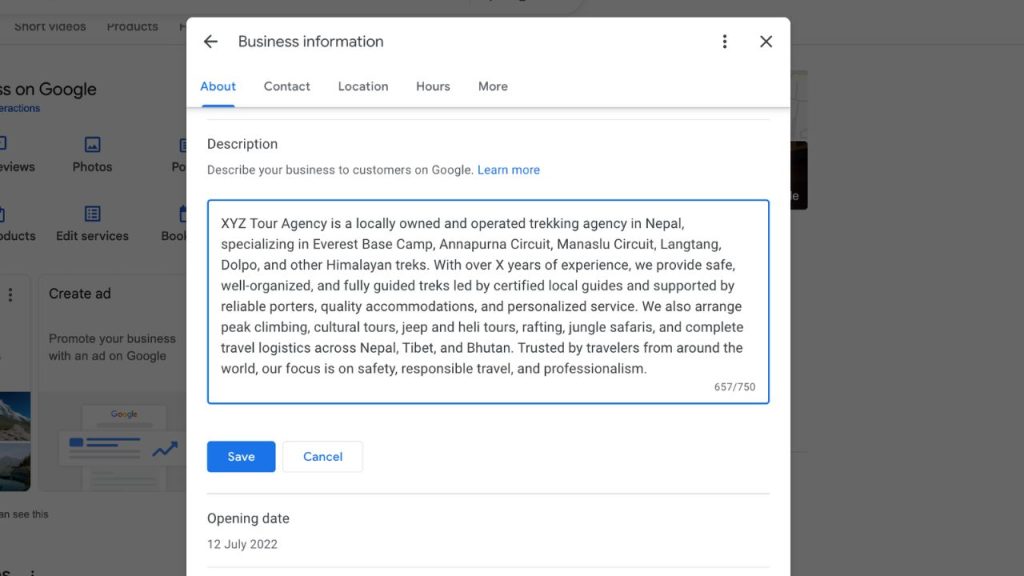
Business Description Optimization for Travel Company
You get 750 characters. That is it. And only the first 250 characters show in the preview. So front-load the important stuff.
Include your primary keyword naturally in the first sentence. Then describe what you do, where you operate, who you serve, and what makes you different.
Example for an inbound operator (UK-based, serving international visitors): “Highland Explorer offers guided adventure tours across the Scottish Highlands for international visitors. From 3-day hiking expeditions to whisky trail day tours, we run small group tours with local guides who know every trail. Operating since 2015 with over 2,000 guests served.”
Example for a domestic operator (UK-based, serving British travelers): “Cotswolds Day Tours runs walking and sightseeing tours from Oxford for UK travelers looking for a weekend escape. Our guides are locals who grew up in these villages. Half-day and full-day options available every weekend, March through October.”
| Do not stuff keywords. Do not write promotional language like “BEST PRICE” or “BOOK NOW.” Do not include HTML, links, or use ALL CAPS. Google may reject your description or penalize your listing for this. |
Opening Hours and Special Hours
This one is more important than most operators realize. Google actually uses your hours to decide if you show up in search results. If someone searches at 7 PM and your listing says you close at 5 PM, Google may push you lower in rankings.
For operators with a physical office, set your actual office hours. For operators without a fixed office, set hours to match when you are available by phone or email. If your tours start at 6 AM, your listing hours should reflect when customers can reach you, not when tours depart.
Seasonal operators, listen up. Update your hours when your season changes. Use “Temporarily closed” during off-season only if you truly do not respond to inquiries at all. The better option is to keep hours active year-round but adjust to inquiry-only hours during the off-season. This way you do not lose visibility in Google during the months when travelers are planning for next season.
Special hours matter too. Add every public holiday where your hours differ from normal. If you skip this, Google shows a “Hours might differ” warning on your listing, and that reduces trust with travelers who are trying to plan their day.
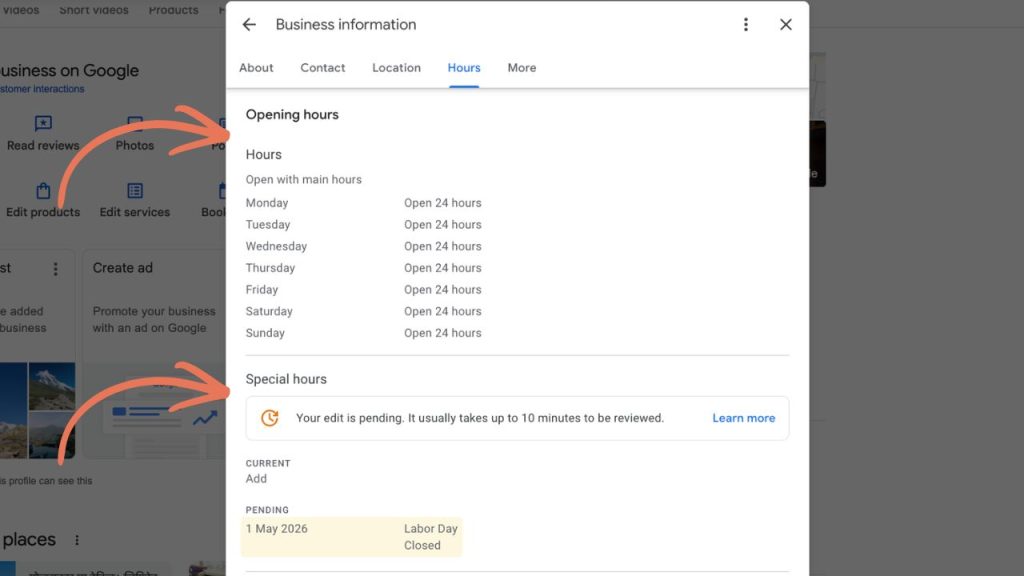
Pro Tip: You can set it to Open 24 Hours, as it won’t push your rank down, even when want to see best tour oeprator in your region.
Phone Number and Website Link
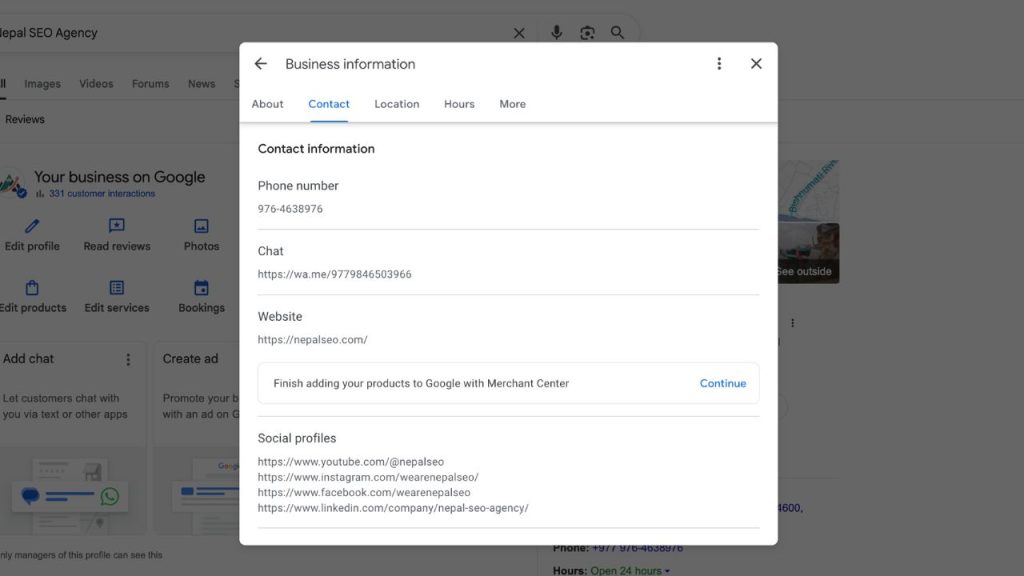
Use a local number. Not a generic toll-free number. Local numbers rank better for local search because Google sees them as stronger geographic signals.
For inbound operators, consider adding a WhatsApp-enabled number. Foreign travelers often prefer messaging over calling, especially across time zones. If WhatsApp is how most of your bookings start, make that number your primary contact.
For the website link, do not just link to your homepage. This is one of the biggest missed opportunities. Link to your most relevant landing page. If you are a safari company, link to your “Safari Tours” page. If you are a walking tour operator, link to your “Book a Tour” page. Send traffic to the page most likely to convert, not a generic homepage where visitors have to dig around.
Photos and Videos That Convert
Photos increase direction requests by 42%. Businesses with 100+ photos get 520% more calls than average. This section is not optional. It is one of the highest-impact things you can do.
Here is what to upload, in order of priority. Cover photo should be your best single tour-in-action shot. Then your logo, clean and recognizable. Then tour action shots showing real guests on the trail, in the boat, or at the viewpoint. Guide photos with real guests build trust. Vehicle and equipment photos show what travelers will actually use. Meeting point photos so guests know where to show up. Destination highlights showing the landscapes, wildlife, or cultural sites guests will see. Food and accommodation photos if those are included in your tour. And group photos as social proof.
Start with 20 to 30 photos across all categories. Then add 3 to 5 new photos every month. Upload short videos under 30 seconds showing tour highlights, guest reactions, or trail footage.
Never use stock photos. Google and travelers can both tell. Use real photos from your actual tours only.
For inbound operators, include photos that answer a foreign traveler’s biggest unspoken questions. What does the accommodation look like? How big are the groups? What condition is the trail or road in? These photos reduce the anxiety that stops someone from booking.
For domestic operators, focus on the experience and the location. Local travelers care less about logistics and more about whether this looks like a good time.
Services and Products Section
This section turns your GBP into a mini booking page. List each tour as a separate product or service with the tour name, a short description covering what is included and duration, the price or price range, and a link to the specific tour page on your website.
Example entry: “3-Day Highland Hiking Tour | Guided small group trek through Glen Coe and Ben Nevis. All meals and accommodation included. From 450 GBP per person.”
Example entry: “Edinburgh Walking Tour | 2-hour guided walk through Old Town. Daily departures at 10 AM and 2 PM. 25 GBP per person.”
Many operators leave this section completely empty. That is free real estate you are giving away. Travelers can browse your tours right on your GBP listing without even visiting your website. Fill it out.
Attributes
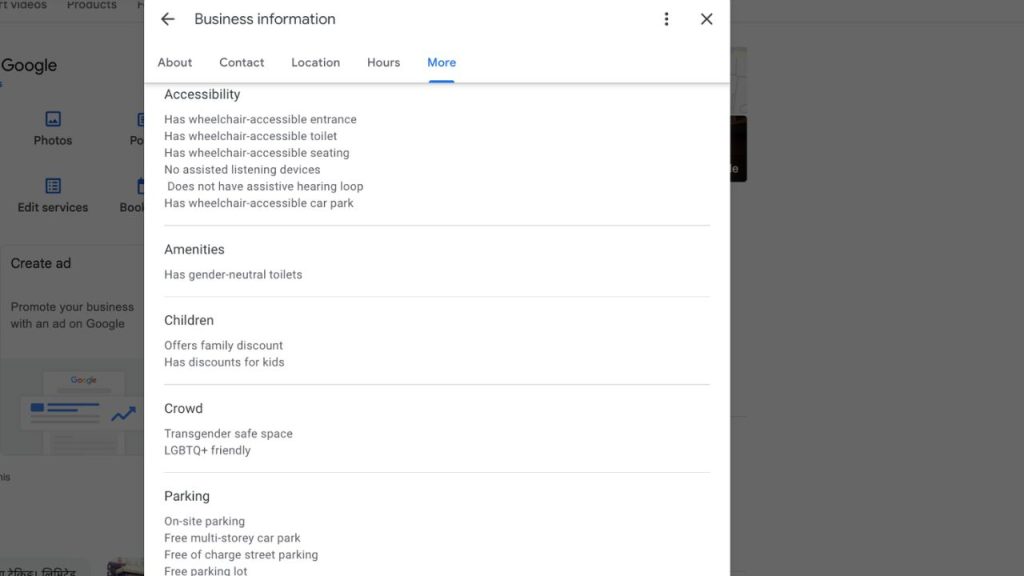
Google offers attributes specific to your business category. For tour operators, common attributes include wheelchair accessible, free Wi-Fi, LGBTQ+ friendly, pet friendly, and languages spoken.
For inbound operators, the languages spoken attribute is critical. Select every language your guides can operate in. This is a major trust signal for a traveler from France or Japan deciding between two companies. If your listing shows their language, you win.
For domestic operators, focus on accessibility and family-friendly attributes. These are decision factors for local day-trippers who are comparing options.
Google Reviews: Getting Them and Responding Right
How Reviews Affect Your Local Ranking
Reviews influence approximately 10% of your local search ranking. Recency, frequency, and rating all matter. Businesses with reviews get 380% more clicks than listings without any. And the sweet spot for conversions is between 3.5 and 4.5 stars. Not a perfect 5.0, which looks suspicious.
So you need reviews coming in consistently. Not 50 in one week then nothing for 6 months. A steady flow of 2 to 5 reviews per month matters more than a big one-time push.
How to Ask for Reviews After a Tour
Ask at the end of the tour when emotions are high and guests are happy. This is when they feel the most positive and are most likely to say yes.
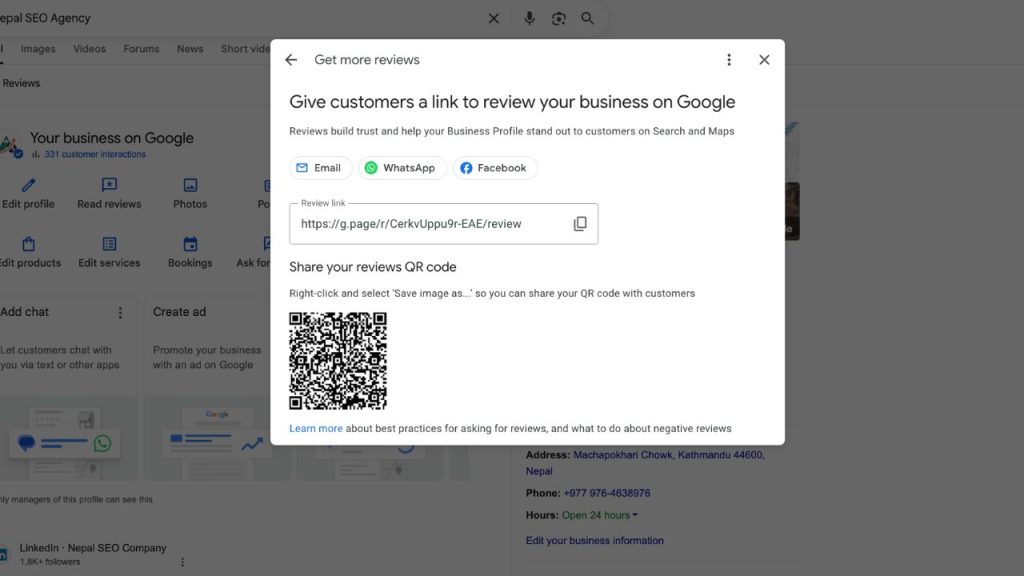
Then follow up within 24 hours with an email or WhatsApp message. Include the direct Google review link, not just “please find us on Google.” Make it one click easy. You can get your shareable review link from your GBP dashboard under “Ask for reviews.”
Encourage guests to upload photos with their review. Reviews with photos stay visible at the top of your review section 10 times longer than reviews without photos. That is huge for social proof.
Responding to Positive Reviews
Always respond. Thank the guest by name. Mention the specific tour or experience they did. Keep it short and warm.
Example: “Thanks Sarah! Glad you enjoyed the Glen Coe hike. The weather was perfect that day. Hope to see you on another trail soon.”
Responding to Negative Reviews
Respond within 24 hours. Never argue. Never get defensive. Acknowledge the issue, explain briefly what happened, and offer to make it right.
Example: “Hi Mark, sorry to hear the pickup was delayed. That is not our standard and we have since added a backup driver for morning tours. Please reach out to us directly so we can make this right for you.”
An unanswered negative review hurts more than the review itself. Travelers judge you by how you handle problems, not by having a perfect record.
Google Posts for Tour Operators
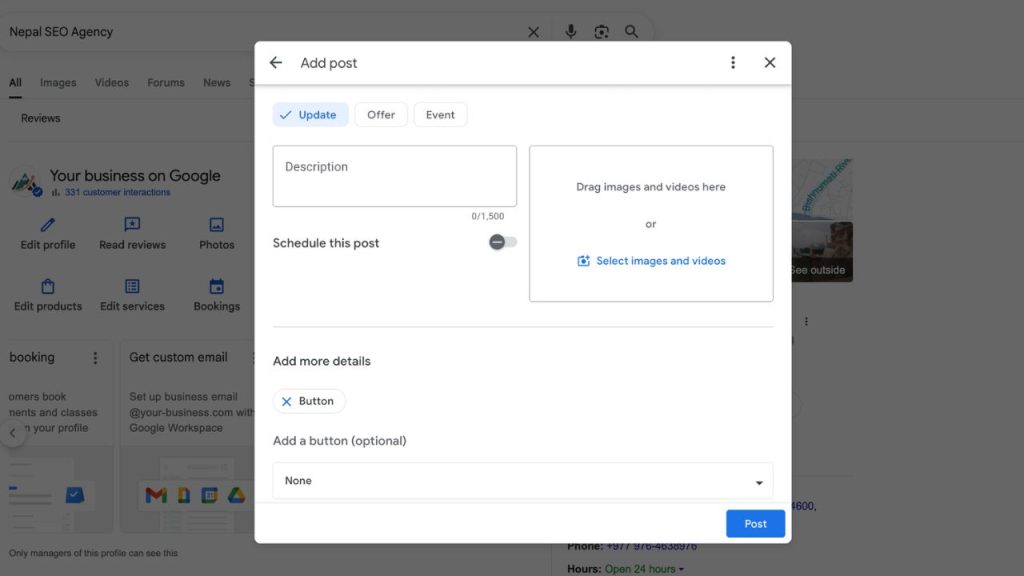
Google Posts sit at the bottom of your profile but they signal to Google that your business is active. Post at least once per week. You do not need to overthink this.
Three post types work well for tour operators. Updates for news and tips. Offers for seasonal discounts and early bird deals. Events for special tours, festivals, or seasonal launches.
Always include a photo or video with every post. Always add a CTA button like Book, Learn More, or Call Now. Link each post to the relevant tour page on your website. Not your homepage.
Keep text under 300 words. Do not include phone numbers in the post text because Google sometimes rejects posts that contain them. Do not use stock photos or overly sales-heavy language.
Post ideas for tour operators: new tour launch announcements, seasonal availability updates, behind-the-scenes guide photos, guest testimonial screenshots, weather or trail condition updates, and holiday special offers.
Common Google Business Profile Mistakes Tour Operators Make
After a decade of working with tour operators on their SEO, we see the same mistakes again and again. Here are the ones that cost the most bookings.
- Keyword stuffing the business name. Google suspends listings for this. Your name should be your real business name with an optional genuine tagline. Nothing more.
- Wrong address setup. Using a home address when you should use a service area. Or showing your office address when customers need the meeting point. Get this right from day one.
- Duplicate listings. Past employees or customers may have created extra listings without you knowing. Search for your business under different name variations and merge or remove any duplicates you find.
- Ignoring negative reviews. An unanswered negative review tells every future customer that you do not care about their experience. Always respond. Always.
- Using stock photos. Travelers spot generic images instantly. Real photos from real tours are the only photos that build trust.
- Not updating for seasons. Stale hours, old photos, and no posts for 6 months make your business look abandoned. Google notices. Travelers notice.
- Linking to your homepage instead of a relevant tour page. Every click from your GBP should land on a page that moves the traveler closer to booking. Not a generic welcome page where they have to navigate around.
- Not using the Products and Services section. This is free space to showcase every tour you run with prices and descriptions. Most competitors leave it empty. Fill it out and you already have an advantage.
Want us to audit your Google Business Profile and fix these issues? Nepal SEO Agency has set up and optimized GBP listings for tour operators across multiple countries. Over a decade of travel SEO experience backing every recommendation. Talk to our team today.
Frequently Asked Questions
Is Google Business Profile free for tour operators?
Yes. GBP is completely free. There is no paid version. You can set up, optimize, and manage your listing at no cost. It is one of the highest-value free marketing tools available to tour operators.
Can I have multiple GBP listings for different tour locations?
Only if each location is a genuinely separate business location with its own staff and address. Do not create multiple listings for one business. Google will penalize or suspend duplicate listings. If you run tours in different regions from one office, use one listing with a service area that covers all regions.
How long does GBP verification take?
Postcard verification takes 5 to 14 days. Phone and email verification are usually instant or same day. Video verification may take a few days for Google to review. Do not change your business name or address while waiting for verification.
How many photos should I upload to my GBP?
Start with 20 to 30 across all categories. Then add 3 to 5 new photos every month. Businesses with 100+ photos get significantly more calls and engagement. Quality matters more than quantity, but volume helps too.
Do Google Posts actually help with ranking?
Google has not confirmed posts as a direct ranking factor. But consistent posting signals that your business is active. That improves engagement and can indirectly help rankings. Think of posts as a tiebreaker. When two tour operators are equally strong, the one posting regularly wins.
What is the best primary category for a tour operator?
Tour Operator is the strongest general choice for most companies. If you specialize, consider Walking Tour Agency, Sightseeing Tour Agency, Boat Tour Agency, or Adventure Sports Center as your primary category based on what matches your core service best.
Is it called Google My Business or Google Business Profile?
Same tool, different name. Google renamed Google My Business to Google Business Profile in November 2021. Both terms refer to the same platform. Many people still search “Google My Business” so both names appear in this guide for clarity.
Set It Up Right and Travelers Will Find You
Google Business Profile is free, powerful, and most of your competitors are not using it properly. That is your opening. A complete, optimized GBP listing puts your tour business in front of travelers at the exact moment they are ready to book.
Every section matters. Your business name, categories, description, photos, reviews, posts, hours. Each one either helps you rank or holds you back. Go through this guide section by section, fill out every field, and keep your listing updated every month.
If you want expert help, Nepal SEO Agency has been setting up and optimizing Google Business Profiles for tour operators for over 10 years. We know what works for trekking companies, safari operators, cultural tour agencies, and adventure travel brands. Get your free GBP audit at nepalseo.com and we will show you exactly what to fix.
